
The Overview page is the first thing you see after logging in to the DIVE portal. It gives you a quick health check of your account: how many verifications you have run, how many succeeded, and how many transactions you have left.
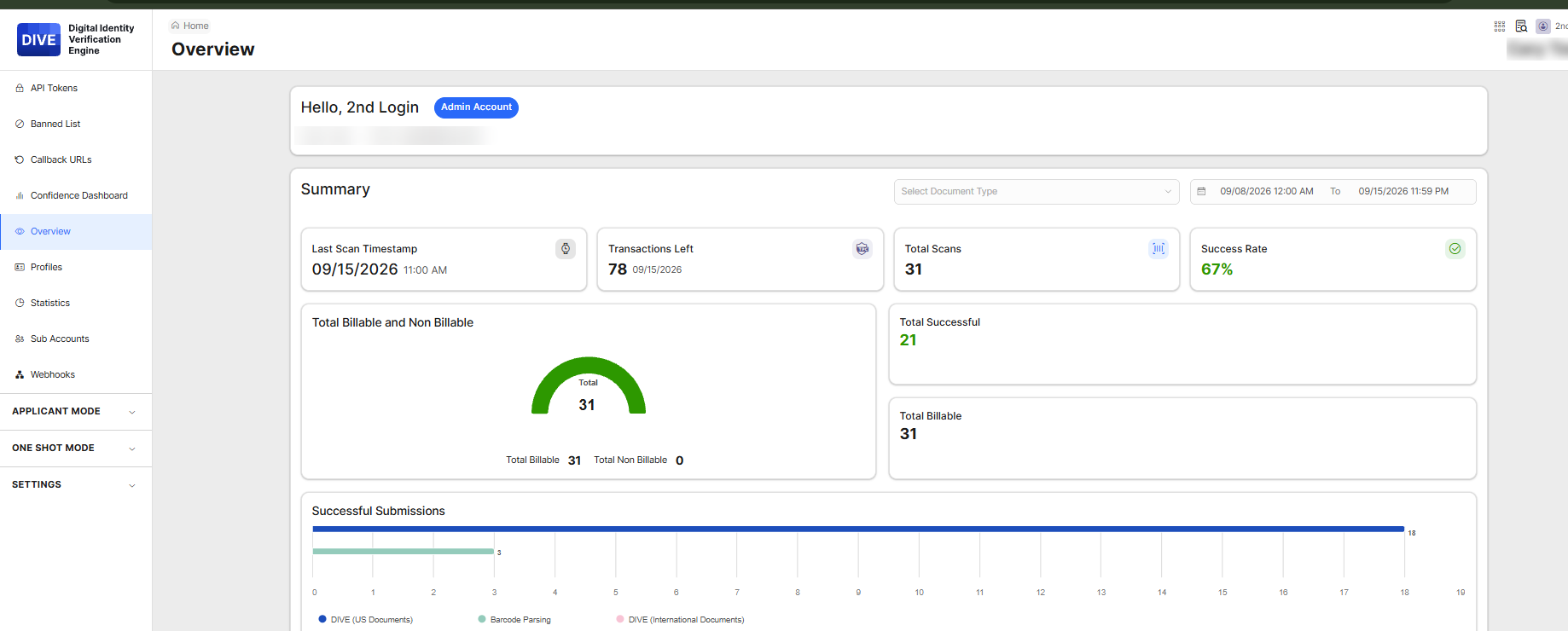
Pick Your Time Period
- Click Overview in the left-hand menu.
- Use the Date Range picker to choose the period you want to look at. Everything on the page updates to match.
- (Optional) Use Select Document Type to focus on one type of ID, such as driver's licenses or passports. Leave it blank to see everything.
The Four Summary Tiles
- Last Scan Timestamp: When the most recent verification happened.
- Transactions Left: How many verifications remain in your current plan.
- Total Scans: How many verifications ran in your chosen period.
- Success Rate: The percentage of verifications that completed successfully.
Billable vs. Non-Billable
The donut chart shows how many of your scans counted against your transaction allotment (Billable) and how many did not (Non Billable). Use it to understand how quickly you are using your plan.
Charts Further Down the Page
Scroll down for charts that show trends. The ones most teams find useful:
- Success Rate (Last 60 Days): Is your success rate going up or down?
- 12 Months Trend: Monthly volume over the past year, split into valid and failed verifications.
- Completion Status: How many requests are Pending, Success, Failed, Expired, or Rejected.
- Most Frequent Error Types: A ranked list of the most common reasons verifications fail, each with a plain-language explanation.
Charts marked exportable have an Export option so you can pull the numbers into a spreadsheet or report.
Find Out Why People Are Failing
- Set the Date Range to the last 30 days.
- Scroll to Most Frequent Error Types.
- Look at the top one or two reasons. If, for example, many people fail because a required image is missing, your applicants may need clearer instructions in your invitation message.
Questions about what you are seeing? Contact support@idscan.net.